Showing posts with label Publishing. Show all posts
Showing posts with label Publishing. Show all posts
Tuesday, March 27, 2007
Business Ethics Training
Nowadays I have been busy authoring caselets for an interactive web-based training capsule on business ethics. The challenge here is on several fronts, for me. First, I have to write fiction. This is new for me. Second, I need to imagine a scenario where a specific type (or at most, two types) of ethical dilemmas arise. Third, I am part of a largish team - including very accomplished writers who convert my 2-page story into a "Storyboard"; then graphic artists create animation characters and finally, the animation team animates the story. It is an excellent experience in collaborative working. Hope this course will be ready by end of May.

Wednesday, October 25, 2006
How to "remove" words from a spell-check Dictionary
Sometimes, we add words to the spell-checker dictionary, after which they do not again turn up. thanks to slightly careless use of the spell-checker. There may be other words you want the spell-checker to throw up for our attention. For example, you may want the words, "filed" and "massage" to be marked as misspellings because you know that the author probably meant "field" and "message". How is that achieved?
1) Create a new document in Word. (or you can use the Notepad for this)
2) Add each word for your exclusion dictionary on a separate line.
3) This file must be saved as a text only file type so if using Word, use File/Save As and change the file type to Text Only (*.txt)
4) Locate folder for your main dictionary (*.lex) and name the file using the same name as your main dictionary but with an .exc file extension.
Typically, the main dictionary is located in the \Microsoft\Proof or \Microsoft Shared\Proof folder, but you can also use Start/Find/Files or Folder and search for *.lex.
The name of the dictionary depends on the language and version of Office that you are using. For example if using English (United States):
Main dictionary:Word 97: Mssp2_en.lexWord 2000: Mssp3en.lex
Exclusion Dictionary:Word 97: Mssp2_en.excWord 2000: Mssp3en.exc
You may need to restart Word after doing this for the exclusion dictionary to be recognised.
1) Create a new document in Word. (or you can use the Notepad for this)
2) Add each word for your exclusion dictionary on a separate line.
3) This file must be saved as a text only file type so if using Word, use File/Save As and change the file type to Text Only (*.txt)
4) Locate folder for your main dictionary (*.lex) and name the file using the same name as your main dictionary but with an .exc file extension.
Typically, the main dictionary is located in the \Microsoft\Proof or \Microsoft Shared\Proof folder, but you can also use Start/Find/Files or Folder and search for *.lex.
The name of the dictionary depends on the language and version of Office that you are using. For example if using English (United States):
Main dictionary:Word 97: Mssp2_en.lexWord 2000: Mssp3en.lex
Exclusion Dictionary:Word 97: Mssp2_en.excWord 2000: Mssp3en.exc
You may need to restart Word after doing this for the exclusion dictionary to be recognised.
A useful "Easter Egg" in Word
"Easter Eggs" are hidden, undocumented features built into software applications. One such useful easter egg in Microsoft Word is described below.
Very often, when we are creating templates, we need running text to check (for example) the number of lines that fit on a page. We might also need text to get a feel of how the whole page will look like when text is filled in. An easy way of inserting dummy text for such purposes is described below.
If you key '=rand()' (without the quotes) and press Enter, you will get 3 paragraphs, 3 sentences each of 'The quick brown...'. If you insert 5,10 between the parentheses, you get 5 paras, 10 sentences each of the same text.
I would be glad to attribute this to the person who told me about it, but I learnt it so long back, that unfortunately I am unable to remember.
Very often, when we are creating templates, we need running text to check (for example) the number of lines that fit on a page. We might also need text to get a feel of how the whole page will look like when text is filled in. An easy way of inserting dummy text for such purposes is described below.
If you key '=rand()' (without the quotes) and press Enter, you will get 3 paragraphs, 3 sentences each of 'The quick brown...'. If you insert 5,10 between the parentheses, you get 5 paras, 10 sentences each of the same text.
I would be glad to attribute this to the person who told me about it, but I learnt it so long back, that unfortunately I am unable to remember.
Thursday, October 19, 2006
Have you seen Open Office lately?
About 3 years back, I had occasion to use, and compare, MS Office with the then available version of Open Office (1.0.something). At the time, I had listed several points of superiority of the latter over the more ubiquitous product. Recently, Open Office version 2.0.4 has been released (a 93 MB download from www.openoffice.org), and promises non-trivial improvements over both, its own earlier product, and the Microsoft Product. Prominent among them is the file format: Open Office 2.0.4 uses the Open Document format, or ODF, the first fully certified--by OASIS and the ISO--open standard for office documents.
This comparison exercise needs to be done again. My old list is given below. Remember, this compares version 1 of Open Office with Office XP.
1. It is free (www.openoffice.org). Windows version is a 50 MB download. Linux and Mac versions are also available.
2. It is in at least a few ways one-up on Word 2002. Some of these are listed below:
This comparison exercise needs to be done again. My old list is given below. Remember, this compares version 1 of Open Office with Office XP.
1. It is free (www.openoffice.org). Windows version is a 50 MB download. Linux and Mac versions are also available.
2. It is in at least a few ways one-up on Word 2002. Some of these are listed below:
- Supports CMYK as well as RGB colour
- Has ability to define a heirarchy (classification) of styles in a template to classify styles for easier access
- Has ability to anchor objects to even a character or page and not just a paragraph
- Allows you to insert and run Java Scripts or the URLs where the scripts are available, at any location in an HTML document
- Allows you to enter References directly into a bibliographic database and call them in a document, now separately available as third party plug-ins to MS Word
- Has its own fairly sophisticated WYSIWYG Math Editor comparable to MathType which is a separate, paid Add-in for MS Word
- Allows part of a document to be designated at Read Only
- Can hyperlink document content to a particular e-mail
- Can assign “Ruby text” (a pronunciation key) to selected Asian language text and specify alignment of ruby text separately
- Search and Replace facility can allow searching for Widows or Orphans
- Style definition flexibility is considerably superior to MS Word. Consider what Style definition permits in Open Office:
- Different specification for Widows and for Orphans
- Separate fonts for Asian and for Latin Text characters, which is not available in Word 2000 but is available in Word 2002. Specifying how many characters permissible before and after hyphen, in addition to hyphenation zone
- Many more styles of underlining than MS Word
- Font in embossed and engraved effects besides shadow
- Placing special emphasis characters above or below each character of style
- Superscript and subscript sizes and positions to be varied as percentage of normal font sizes
- Creation of decimal aligned tab to align at a comma or any other character by treating it as the decimal character
- Setting a grid for a Reference style and for the base line of another style to snap to the grid of the reference style.
- Alignment of characters of para to base or top where a few characters in a paragraph are in significantly larger font than others.
3. It is quite programmable because
a) It has its own answer to Visual Basic
b) it can translate VBA macros in existing Word files into its own version of Basic and
c) It also supports programming in Java.
d) I haven't tested out the programming languages and features and hence cannot comment on how good or bad they are.
4. It has a "developer version" and the source code of each version also available for download.
5. It can open any version of MS Word or RTF, or MS Excel files, and also save in any MS Office format.
Microsoft Word Trick
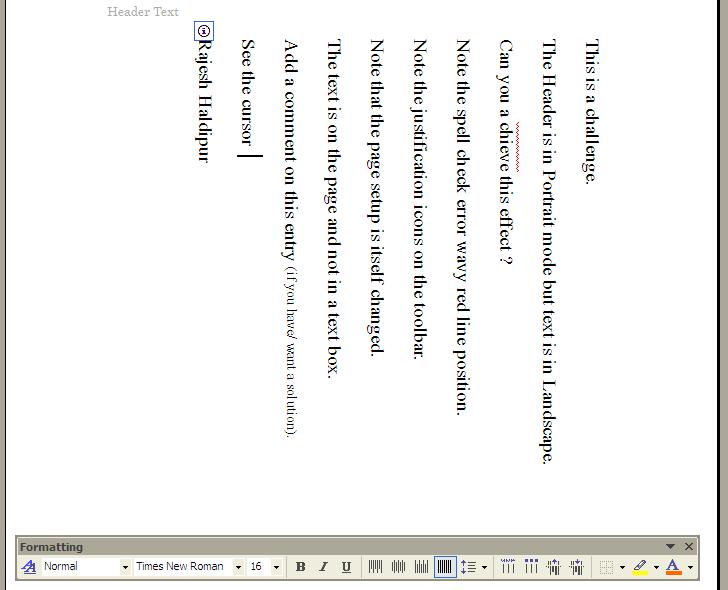 Have you ever wanted to have portrait headers and footers on a page that has text or tables running in landscape mode, or vice versa?
 See the screen capture.
Note carefully the smart tag icon, the justification icons on the toolbar and the cursor in the picture.
Do you understand how this effect is achieved ?
The page setup is itself changed.
The text is on the page and not in a text box.
The Header is in the Header pane.
Add a comment if you know or want the solution to this challenge.
InBox tracking changes in your favourite websites
Another new exciting product from Google!
Just imagine: Like your email client fetches all your new email, a webpage that fetches the new webpages from all your favourite websites!
The new product is called Google Reader.
Just imagine: Like your email client fetches all your new email, a webpage that fetches the new webpages from all your favourite websites!
The new product is called Google Reader.
Monday, October 16, 2006
Fishlock's Eye-view of India
Trevor Fishlock lived and reported out of India for several years. He wrote a book called INDIA FILE, chronicling his view of India, which was first published in 1983. His "outsider-looking-in" view of India is very perceptive indeed, and still rings true, even a quarter-century after it was first written. It is rivalled in recent times by Suketu Mehta's Maximum CIty, which chronicles the seamier side of Mumbai city alone.
Some excerpts will (hopefully) indicate why I found this old book which I chanced upon, so interesting.
"Indians are a tactile people, living thigh by thigh, jostling, rubbing, holding hands and embracing, close to each other's breath and borborgymi, the bubble of each other's pots. They have learned to cram, to take a deep communal breath to admit just one more, to fill every crevice, to hang by their nails, to sit on one buttock, to stretch the seams of their streets, houses and vehicles. ... Indeed, the true Indian motif is not the Taj Mahal, the elephant or the patient-peasant behind the ox-drawn plough. It is the crowd, the ocean of faces in the land of multitudes, endlessly stirring, pushing, moving, as teeming and vigorous and urgent as spermatozoa." ...
"Whatever he chooses, an Indian with even a little education will hope to occupy a 'position'. India is a community of heirarchies, rigidly stratified, and a position is of great importance"...
"By shouting 'Expedite!' Indian leaders can achieve much. As I write, builders and engineers are creating records in building stadiums, hotels, roads and bridges for the Asian Games in Delhi. Four of five years' work is being compressed into two. It is a feat by any standard. (Why it all had to be done in such a rush is another matter.) In India, the eleventh hour often seems to be soon enough. ... The first time I went to a wedding, I arrived on time and was the only person there: the other guests arrived an hour later and the event began an hour after that." ...
"The marriage of the Prince of Wales in 1981 had elements familiar to Indians. He had, quite properly, to accept the constraints of his position and marry in accordance with his dharma, his responsibility and role in life. He could not permit himself to fall cap over spurs for just anyone: his great-uncle, Edward VIII, strayed from his dharma and inevitably lost his throne. The Prince of Wales's marriage had to a large extent to be an arranged one. His bride had to be a virgin, and capable of bearing children, facts announced in the newspapers. She had to be attractive, and of the prince's caste, the landed gentry. (Out-of-caste marriages still make news in Britain. The union of an earl's daughter with a lorry driver will always provide newspapers with a story).
As a rule, Indian marriages are not merely the union of two people, but a linking of families, clans and groups. Parents take pains to find compatible partners within the usual social requirements. They look for what any parent would look for, an attractive and decent character. Love is regarded as an unreliable basis on which to begin a marriage and is an emotion which is expected to develop." ...
"The sari is eternally in fashion, comfortable and right, and while the changes are rung mainly in colours and patterns, there are varying ways of wearing it. For example, the skirt may be worn high, or sometimes low on the hips, accentuating the belly-swell considered so attractive. Smart women in Bombay sometimes like to show some buttock cleavage, and the blouse, or choli, may also be low-cut. The sari is a garment of languorous grace, not suited to rapid activity. The wet sari, as seen clinging to film actresses, has in recent years come to represent an erotic ideal." ...
"A kiss is rerely seen in an Indian film, being too daring, and too offensive, in a society where such physical pleasures are enjoyed in private. Few Indian couples show affection in public. You hardly ever see boys and girls holding hands, and you never see them canoodling in the parks. Indeed, in parks, you are more likely to see groups of boys and girls sitting in sexually segregated circles, some yards apart."
Some excerpts will (hopefully) indicate why I found this old book which I chanced upon, so interesting.
"Indians are a tactile people, living thigh by thigh, jostling, rubbing, holding hands and embracing, close to each other's breath and borborgymi, the bubble of each other's pots. They have learned to cram, to take a deep communal breath to admit just one more, to fill every crevice, to hang by their nails, to sit on one buttock, to stretch the seams of their streets, houses and vehicles. ... Indeed, the true Indian motif is not the Taj Mahal, the elephant or the patient-peasant behind the ox-drawn plough. It is the crowd, the ocean of faces in the land of multitudes, endlessly stirring, pushing, moving, as teeming and vigorous and urgent as spermatozoa." ...
"Whatever he chooses, an Indian with even a little education will hope to occupy a 'position'. India is a community of heirarchies, rigidly stratified, and a position is of great importance"...
"By shouting 'Expedite!' Indian leaders can achieve much. As I write, builders and engineers are creating records in building stadiums, hotels, roads and bridges for the Asian Games in Delhi. Four of five years' work is being compressed into two. It is a feat by any standard. (Why it all had to be done in such a rush is another matter.) In India, the eleventh hour often seems to be soon enough. ... The first time I went to a wedding, I arrived on time and was the only person there: the other guests arrived an hour later and the event began an hour after that." ...
"The marriage of the Prince of Wales in 1981 had elements familiar to Indians. He had, quite properly, to accept the constraints of his position and marry in accordance with his dharma, his responsibility and role in life. He could not permit himself to fall cap over spurs for just anyone: his great-uncle, Edward VIII, strayed from his dharma and inevitably lost his throne. The Prince of Wales's marriage had to a large extent to be an arranged one. His bride had to be a virgin, and capable of bearing children, facts announced in the newspapers. She had to be attractive, and of the prince's caste, the landed gentry. (Out-of-caste marriages still make news in Britain. The union of an earl's daughter with a lorry driver will always provide newspapers with a story).
As a rule, Indian marriages are not merely the union of two people, but a linking of families, clans and groups. Parents take pains to find compatible partners within the usual social requirements. They look for what any parent would look for, an attractive and decent character. Love is regarded as an unreliable basis on which to begin a marriage and is an emotion which is expected to develop." ...
"The sari is eternally in fashion, comfortable and right, and while the changes are rung mainly in colours and patterns, there are varying ways of wearing it. For example, the skirt may be worn high, or sometimes low on the hips, accentuating the belly-swell considered so attractive. Smart women in Bombay sometimes like to show some buttock cleavage, and the blouse, or choli, may also be low-cut. The sari is a garment of languorous grace, not suited to rapid activity. The wet sari, as seen clinging to film actresses, has in recent years come to represent an erotic ideal." ...
"A kiss is rerely seen in an Indian film, being too daring, and too offensive, in a society where such physical pleasures are enjoyed in private. Few Indian couples show affection in public. You hardly ever see boys and girls holding hands, and you never see them canoodling in the parks. Indeed, in parks, you are more likely to see groups of boys and girls sitting in sexually segregated circles, some yards apart."
Thursday, October 12, 2006
Google Docs & Spreadsheets
Word processors and spreadsheets have just changed – and the way we use them will quite likely change, very soon.
Google has introduced a single interface for online Spreadsheets and Documents with very similar look and feel. It may not have all the features of Microsoft Word and Excel, but it is getting there – very fast.
It has two features which make eminent sense – and are a pain to manage using MS Office: you can share a single document with many people, and more than one person can work on the same document at once from two different places. This means that when Suhas in Pune enters something into his spreadsheet, Anupam in
Hitherto, this was only possible with MS Sharepoint Server (an expensive server product from Microsoft) installed and accessible to each user. Alternatively, we had to live with version proliferation, a raging headache in geographically dispersed, collaborative and asynchronous environment. Collaboration is managed very simply by the system of “inviting” – which we are familiar with, when we invite others to open a GMail account. We simply Invite each contact to view or invite to edit. Only condition is that all users have a gmail account.
Existing Word and Excel files can be uploaded and used online. You have the choice of saving the files online, so that they can be accessed by you anywhere from any computer connected to the Net. You can also save them in Word or Excel format on your local machine. You can also create PDF files and save files in Open Document format (the format popularized by Open Office), which is something like compressed (zipped) set of XML files conforming to the OpenOffice DTD.
As the number of your files increase, you can use the features of tags, stars and of course, google searches, to organize, search and retrieve what you want. These features are probably familiar to users of GMail. Try out this service!
Check out the official Google Docs and Spreadsheets Blog.
[1] Unlike chat windows, others cannot see what you are typing in, when you are online. Once the document is refreshed, or autosaved, collaborators will be able to see your changes, and you'll be able to see theirs. Once you make a change to a particular cell of a spreadsheet and exit that cell, collaborators will be able to see your changes and vice-versa.
If you're the creator of the spreadsheet, you can remove editors/viewers at any time, and that access removal is instantaneous.
The people whom you've invited can now add other collaborators to that spreadsheet. You can decide whether you want this capability turned on for each spreadsheet individually - the default for new spreadsheets is to allow collaborators to add other collaborators. However, collaborators cannot remove the owner from his or her spreadsheet.
People you invite to "edit" the spreadsheet can change any aspect of the spreadsheet they wish, while people invited to "view" can only navigate around the spreadsheet without changing the content, format, or structure at all. Both viewers and editors may save the spreadsheet to their personal spreadsheets storage, or to their local storage (using “File" > "Export" command).
Subscribe to:
Posts (Atom)